

How to Capture Price-Sensitive Shoppers with WooCommerce Price Drop & Target Price Notifications
Oct
Introduction
Every e-commerce store has them: browsers who inspect your product pages, look at pricing, and leave without purchasing. They aren’t uninterested—they are simply waiting for the right signal or a price point that matches their budget. That is why deploying automated WooCommerce price drop notifications turns those missed opportunities into sales
Without a direct way to capture that intent and alert shoppers when pricing changes, those potential sales quietly fade away. Worse yet, even when a price does drop, a simple notification alone won’t always spark immediate action if a buyer needs a tailored incentive.
In this guide, we’ll explore how automated WooCommerce price drop notifications work, why combining price alerts with targeted Recovery Offers drives higher conversions, and how to set up an automated loop that turns price-sensitive browsers into buyers.
1. The Real Friction: Why Notifications Alone Leave Money on the Table
When store owners drop prices—whether for seasonal clearouts or flash sales—they face two primary obstacles: visibility and buyer inertia.
- Passive Price Drops: Discounting a product only works if shoppers know about it. Relying on passive site banners or hoping customers return to re-check product pages leads to missed opportunities.
- Alert Friction without Incentive: Getting a price drop notification is helpful, but if the shopper is still on the fence, a basic informational email won’t always spark immediate action. They might open the email, think “I’ll check this later,” and forget.
To truly close the recovery loop, merchants need two mechanics working in tandem: granular intent tracking (capturing target prices) and an incentive engine (delivering targeted recovery offers to complete the purchase).
2. Two Distinct Pathways to Recover Price-Sensitive Demand
Not all price-sensitive sales happen through site-wide discounts. Smart Stock Notifications provides two flexible pathways to convert interested browsers into active buyers:
                        ┌────────────────────────┐
                        │   [CUSTOMER INTENT]    │
                        │ Shopper tracks item or │
                        │   sets Target Price    │
                        └───────────┬────────────┘
                                    │
           ┌────────────────────────┴────────────────────────┐
           ▼                                                 ▼
[PATH 1: CATALOG PRICE DROP]                      [PATH 2: RECOVERY OFFER ACCEPTANCE]
Admin updates product/sale price                  Product price remains unchanged
           │                                                 │
   Criteria Evaluated:                            Admin approves specific target price
   • No target price = Fire on drop               System generates single-use coupon
   • Target price set = Price ≤ Target              (Delta = Current Price - Target)
           │                                      Policy rules checked (Global/Product)
           ▼                                                 ▼
┌────────────────────────┐                        ┌────────────────────────┐
│  PRICE DROP ALERT EMAIL│                        │  TARGETED OFFER EMAIL  │
│ Direct link back to    │                        │ Personalized single-   │
│ product page           │                        │ use coupon included    │
└───────────┬────────────┘                        └───────────┬────────────┘
            │                                                 │
            └────────────────────────┬────────────────────────┘
                                     ▼
                        ┌────────────────────────┐
                        │   [CUSTOMER PURCHASE]  │
                        │ Shopper completes order│
                        │ at desired target price│
                        └────────────────────────┘
Path 1: Automated Catalog Price Drops
When you update a product or variation price across your store, the plugin automatically evaluates subscriber criteria:
- General Price Tracking: If a shopper opts in without specifying a target price, any price drop fires an instant email notification.
- Target Price Matching: If a shopper specifies a target price (e.g., $45 on a $60 item), the notification fires only when the new price drops to or below $45.
Path 2: Targeted Offer Acceptance (Without Site-Wide Discounts)
Sometimes you want to capture a high-intent buyer without lowering the product’s regular catalog price for the public.
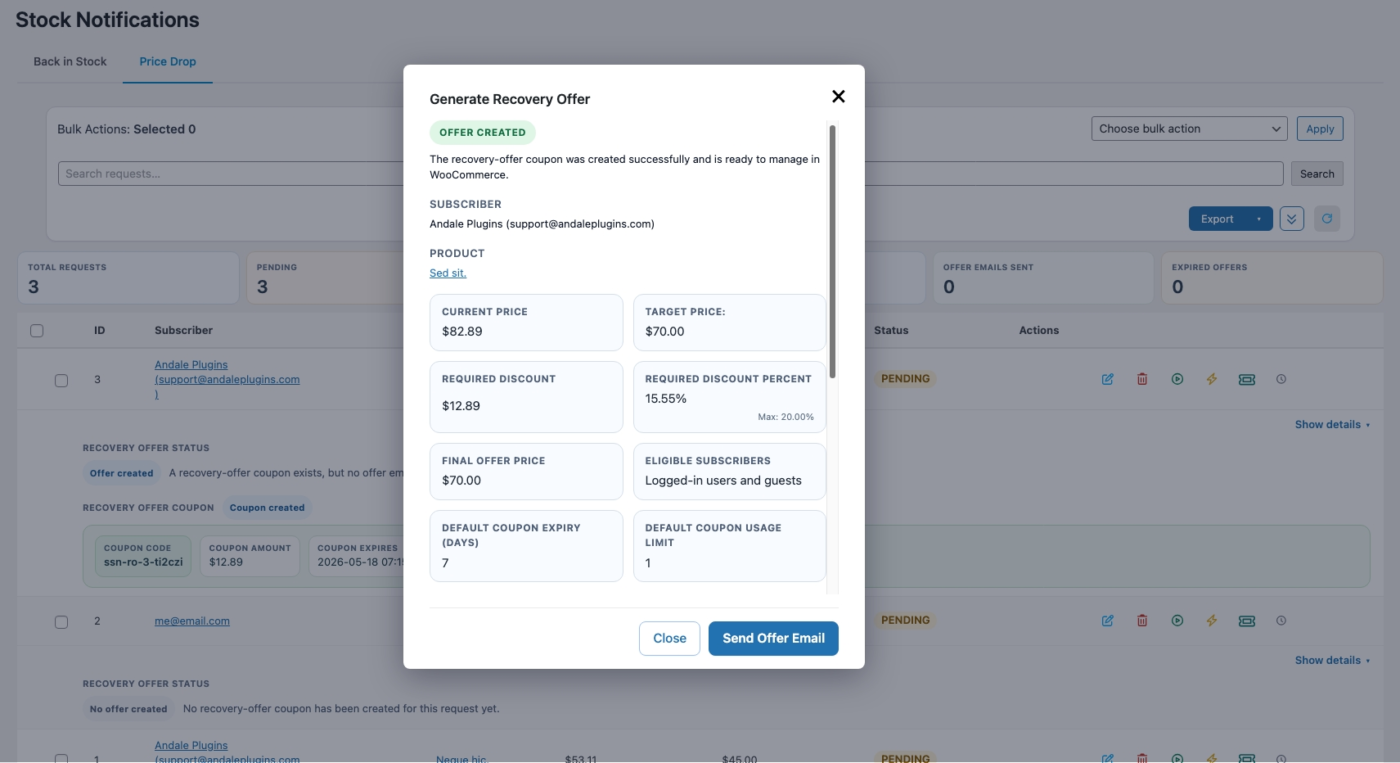
- Dynamic Coupon Generation: You can accept a specific customer’s target price offer directly from your dashboard while keeping the main retail price unchanged.
- Exact Delta Discounting: The system automatically calculates the exact difference between the current product price and the customer’s target price, generating a unique, single-use coupon code for that amount.
- Configurable Guardrails: Built-in recovery policies enforce safety rules—such as maximum discount percentages or capped dollar amounts—at both global and product-specific override levels so you never erode your margins.
3. Key Components of a High-Converting Price Recovery Workflow
To convert price sensitivity into instant orders, your WooCommerce price drop notifications workflow should include these three essential elements:
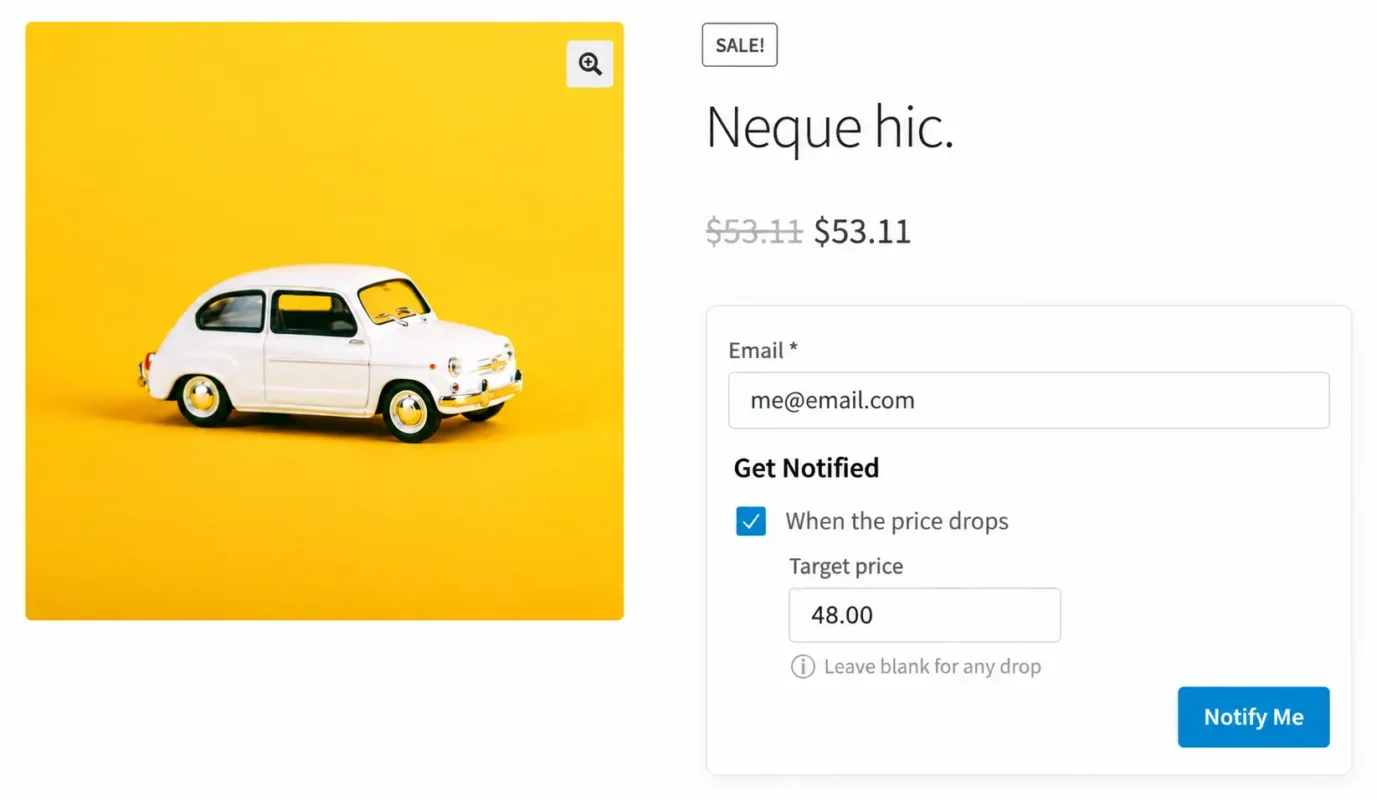
- Frictionless Target Price Capture: Clean, native opt-in forms integrated directly on WooCommerce product pages, supporting both simple products and variable attributes.
- Automated Triggering & Rule Engine: Instant detection of price changes (regular or sale price updates) in WooCommerce to fire notifications without manual administration.
- Automated Recovery Offer Templates: Dedicated email templates that highlight the price difference and present a clear recovery incentive with a direct link back to checkout.
4. Setting Up Price Alerts & Recovery Offers in Smart Stock Notifications
Setting up this automated revenue recovery loop requires zero coding:
Step 1: Enable Target Price Capture
Activate price drop alerts across your catalog. The capture box seamlessly renders on your product and variation pages.
Step 2: Configure Your Recovery Offer Template & Guardrails
In the plugin settings, configure your recovery policy parameters (global max percent or fixed discount limits) and set up product-level overrides where needed. Customize the Recovery Offer email template so personalized single-use coupons populate automatically when accepting target price requests.
Step 3: Monitor Demand Intelligence
Use your backend dashboard to track subscriber volume per product and variation. This demand data tells you exactly which items have high buyer interest, helping you make informed decisions on pricing strategy, offer acceptance, and stock replenishment.
Internal Link Note: Managing price sensitivity is only half the battle. When high-demand items sell out completely, you need a system that captures back-in-stock demand seamlessly. Read our guide on how to automatically notify WooCommerce customers when out-of-stock products return to complete your stock and price recovery setup.
Conclusion: Turn Price-Sensitive Browsers into Automated Revenue
Lowering prices without a direct, incentivized communication channel leaves sales behind. By combining automated price drop alerts with built-in Recovery Offers, you turn passive interest into immediate, trackable revenue.
- Ready to automate your price recovery? Learn more about Smart Stock Notifications today or purchase directly via the WooCommerce Marketplace.
