

How to Automatically Notify WooCommerce Customers When Out-of-Stock Products (Including Variations) Return
Oct
Why WooCommerce Back In Stock Notifications Matter
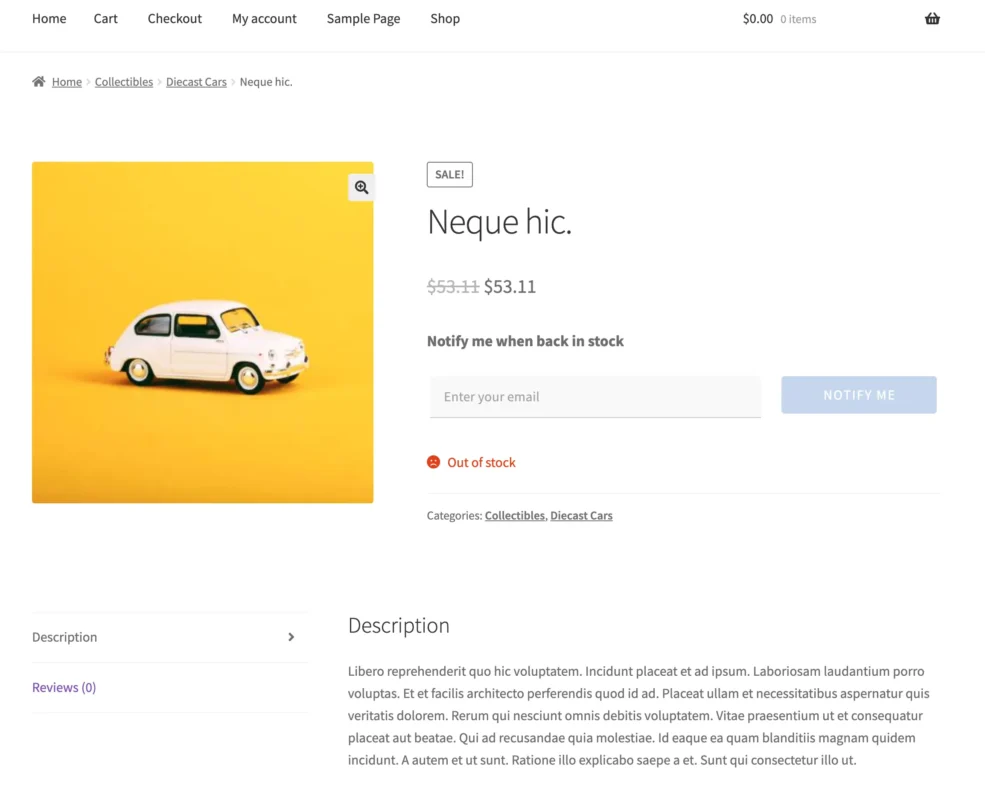
Imagine spending hard-earned ad dollars, optimizing your SEO, and driving a high-intent shopper straight to your WooCommerce store. They land on your product page, love what they see, select their exact size and color… and hit a wall: “Out of stock.”
What happens next? In 99% of online stores—specifically those lacking WooCommerce back in stock notifications—that shopper clicks away, closes the tab, and buys from your competitor. That traffic—and that revenue—is gone forever.
For store owners running multi-attribute stores (fashion, electronics, home goods, or custom apparel), this scenario happens dozens of times a day. Out-of-the-box WooCommerce handles simple products relatively well, but when it comes to variable products, it leaves a massive blind spot. Native WooCommerce tells the customer an item is out of stock, but it offers them no way to raise their hand and say, “Notify me the second this exact combination is back.”
Relying on generic contact forms or forcing customers to manually check back days later is a recipe for leaked revenue. In this guide, we’ll look at why out-of-stock variations leak profit, why native WooCommerce falls short, and how you can turn dead-end traffic into guaranteed sales on autopilot.
1. The Hidden Cost of Out-of-Stock Variations
Inventory gaps are inevitable. Whether you’re dealing with supply chain delays, seasonal rushes, or high-velocity limited drops, products will run out.
However, losing a sale on a simple product is painful enough; losing a sale on a variable product is often an architectural failure. For example, if you sell a jacket in three colors and four sizes (12 total variations), and only one specific combination sells out (e.g., Medium in Olive Green), a generic “Out of Stock” notice stalls the entire purchase flow.
When a shopper encounters that dead end:
- They rarely scroll back up to see if Small or Large is available.
- They won’t email your support team to ask when the Olive Green Medium is returning.
- They bounce to Google, where your competitor is waiting with an “In Stock” button.
Every out-of-stock variation is a leak in your conversion funnel. To fix it, you need automated WooCommerce back-in-stock notifications that capture customer intent at the exact moment of disappointment.
2. Why Native WooCommerce Falls Short
If you check the core WooCommerce codebase, you won’t find a native subscription mechanism for out-of-stock inventory.
Out of the box, WooCommerce lets you:
- Mark a product/variation as out of stock.
- Hide out-of-stock items entirely (which kills your SEO landing page traffic).
- Allow backorders (which introduces massive fulfillment and customer satisfaction risks if expectations aren’t managed).
What it doesn’t do is track who wanted what specific variation, nor does it automate the outreach when restock day arrives. Merchants often try patching this with messy workarounds—like asking customers to fill out a general contact form or signing up for a site-wide newsletter. But a generic newsletter signup doesn’t tell you that Customer A is waiting for a Medium Olive Jacket, while Customer B is waiting for a Large Black Boot.
3. The Anatomy of a High-Converting Back-in-Stock Workflow
To turn out-of-stock anxiety into captured revenue, your store needs a closed-loop workflow:
- Granular Capture: When a shopper selects an out-of-stock attribute combination (e.g., Size: M, Color: Olive), a clean, non-intrusive email input form appears instantly on the product page.
- Demand Intelligence: In your admin dashboard, you aggregate real data on which specific variations have pent-up demand. If 40 people are waiting for Medium Olive, but only 2 are waiting for Small Red, your next purchasing decision becomes data-driven.
- Automated Triggering: The moment you restock that specific item in WooCommerce, the system automatically fires an alert to the waiting list.
- The Recovery Incentive: A notification gets them back to the site, but pairing that notification with an automated recovery offer (like a limited-time restock coupon) closes the sale before hesitation sets in.
4. Bridging the Gap with Smart Stock Notifications
Trying to manually manage waitlists or duct-taping generic plugins together wastes valuable operational hours. That is precisely why we developed Smart Stock Notifications.
Built specifically for WooCommerce merchants who rely on complex product catalogs, Smart Stock Notifications automates the entire recovery loop:
- Attribute & Variation Precision: It maps directly to the exact variation your customer wants. No guesswork, no generic signups.
- Built-In Recovery Offer Engine: It allows you to automatically generate and attach targeted coupons to your restock emails, giving shoppers an immediate incentive to check out.
- Demand Insights: It surfaces high-demand items right in your WordPress dashboard so you can prioritize what to restock next.
Ready to Stop Leaking Revenue?
Stop letting out-of-stock variations walk out the door. With woocommerce back in stock notifications, capture customer intent, build your waitlist, and turn inventory gaps into your most reliable sales channel.
- Want to buy direct? Get Smart Stock Notifications right here on Andale Plugins.
- Prefer official channels? You can also purchase and install it securely via the WooCommerce.com Marketplace.
